Help center
Guides for the coaching loop
Desktop setup, match debriefs, coaches, and billing — everything you need after signup.
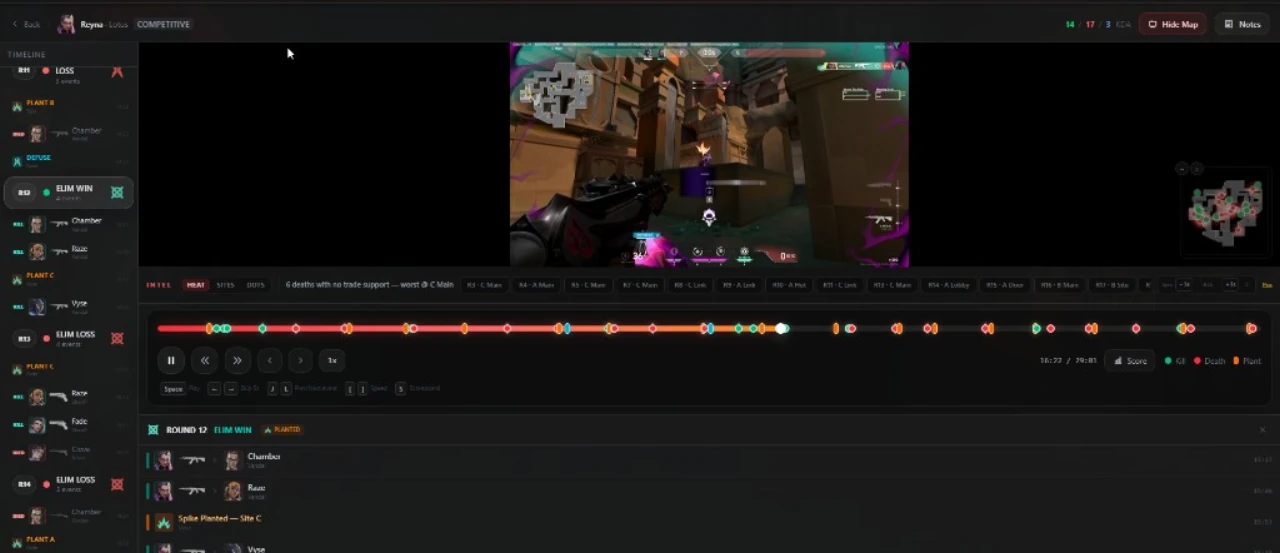
First debrief in four steps
Create your account
Sign up free — 1 free coaching analysis included, no card required.
Download the desktop app
Windows app connects to OBS and records when ranked starts.
Play a ranked match
When the game ends, your VOD and match data queue for coaching.
Open your debrief
Round breakdowns, priority fixes, and drills land on your dashboard.
Getting started
From signup to your first coached match.
What is UpForge today?
UpForge is a coaching platform for competitive games — match debriefs after ranked, improvement tracking, and a marketplace of verified human coaches. Valorant has the deepest integration; CS2 and Deadlock are supported too.
Do I need the desktop app?
For the best experience, yes. The Windows desktop app connects to OBS, auto-records when your match starts, and queues a full debrief when you finish — no YouTube links or manual uploads. You can still submit web VODs or CS2 demos from the browser.
How do I create an account?
Sign up at upforge.gg with email and password. Verify your email, link your Riot account (Valorant) or Steam (CS2 / Deadlock) when prompted, then download the desktop app or submit your first analysis from the web.
What do I get for free?
Every account includes 1 free coaching analysis, the desktop app, scout timeline markers, and access to the knowledge base — no credit card required. Plus and Pro add monthly volume, deeper coaching, trends, and group sessions.
Match debriefs
How recording, analysis, and review work.
How does desktop recording work?
UpForge uses OBS over WebSocket — your GPU encodes the match (NVENC / AMF / QuickSync). We orchestrate start/stop around ranked games; nothing hooks into the game process.
How long does a debrief take?
Most desktop matches finish in 10–30 minutes depending on length and queue load. You get email or Discord notification when the debrief is ready.
Can I analyze without the desktop app?
Yes — paste a Valorant VOD link (YouTube, Medal.tv, insights.gg) or upload a CS2 .dem from the web. Desktop captures include richer match metadata for better coaching.
What games are supported?
Valorant (full pipeline), CS2 (demo analysis + FACEIT sync on Pro), and Deadlock (expanding coverage). One account works across all supported games.
Coaches & billing
Subscriptions, marketplace, and human coaching.
What is the difference between Plus and Pro?
Free includes recording, basic clips and one lifetime report trial. Plus is $9.99/month for app features and five monthly reports. Pro is $19.99/month with fifteen full-match reports. Extra reports cost $6.99 for three on any plan. Existing subscriptions keep their allowances. See /pricing for cloud limits and coaching allowances.
How do human coaches work?
Browse verified Immortal+ coaches on the marketplace for live sessions, or join a coach roster for async timeline reviews on your matches. Human coaching is booked and paid per coach — separate from your AI subscription.
What are weekly group sessions?
Included with Plus and Pro. Live Discord sessions with high-rank coaches — community VOD reviews, meta discussion, and Q&A alongside your debrief history.
Can I buy analyses without subscribing?
Yes — prepaid analysis bundles are on the pricing page. Credits never expire and stack with a subscription if you upgrade later.
Troubleshooting
When something does not work as expected.
My analysis failed — will I lose a credit?
Transient failures (server issues, timeouts) refund your reserved credit automatically. Permanent errors (private video, unsupported link) may consume a credit — check the failure message on your results page.
OBS is not connecting
Open OBS, enable WebSocket server (Tools → WebSocket Server Settings), run the desktop app’s OBS setup wizard, and confirm UpForge is allowed through Windows Firewall. See /desktop for the full guide.
I hit my free analysis limit
Free accounts get 1 free coaching analysis. When they are used, upgrade to Plus or Pro, or buy a prepaid bundle on /pricing. Your dashboard shows remaining credits.
Riot verification is not working
Use the exact in-game verification code — it expires in a few minutes. Regenerate if needed. Confirm your Riot ID format (Name#TAG) matches your account.
Short answers? Browse the FAQ →
Still stuck?
Discord is the fastest way to get help. We usually reply within 1–2 business days. Email support@upforge.gg for billing or account issues.