What good VOD review covers
Strong sessions pick two deaths and one winning round pattern — not a full 40-minute lecture. Coaches mark positioning, utility timing, and decision forks you can practice in the next ten games.
VOD review
VOD review works when the coach sees the same rounds you do — with economy, timing, and agent context. UpForge debriefs plus full match recording mean sessions start on round seven, not twenty minutes of setup.
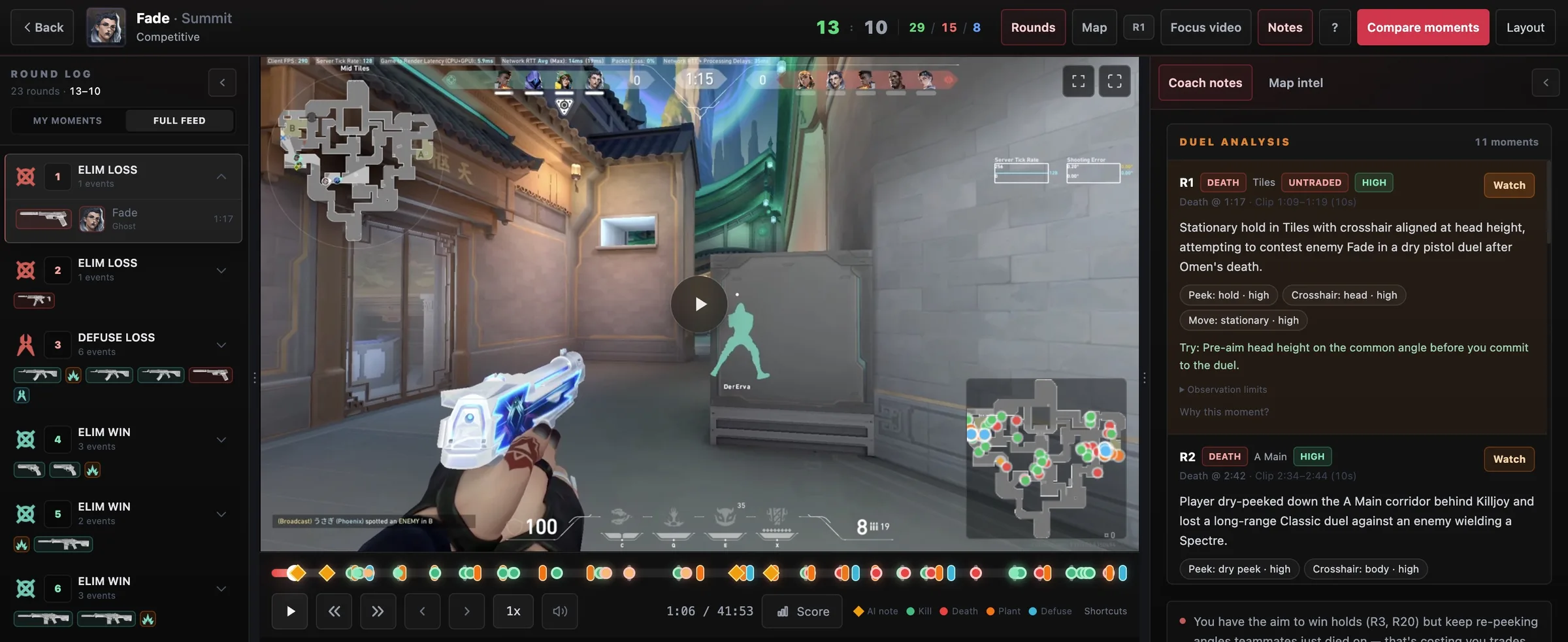
Practical focus areas for ranked players — start with debriefs, escalate to a coach when habits won't stick.
Strong sessions pick two deaths and one winning round pattern — not a full 40-minute lecture. Coaches mark positioning, utility timing, and decision forks you can practice in the next ten games.
The desktop app auto-records ranked matches and attaches your Riot timeline. Coaches open your debrief, jump to flagged rounds, and book from the same platform — no manual upload or expired links.
Other Valorant coaching paths on UpForge.
Metafy excels at live coach marketplaces. UpForge adds automatic match debriefs before you book — coaches inherit priority fixes and timeline data from your ranked games, not a cold VOD link.
PC players get the fullest experience with auto-record and timeline sync. You can also share debriefs from matches already processed on your account.
Book VOD review when debriefs flag the same rounds twice and you want a human to walk through alternatives in real time.